Your product context, right beside the page.
Open a product page on your store or a tracked competitor's site. twelfth puts price, stock, sales, cover and margin in a read-only Chrome side panel.
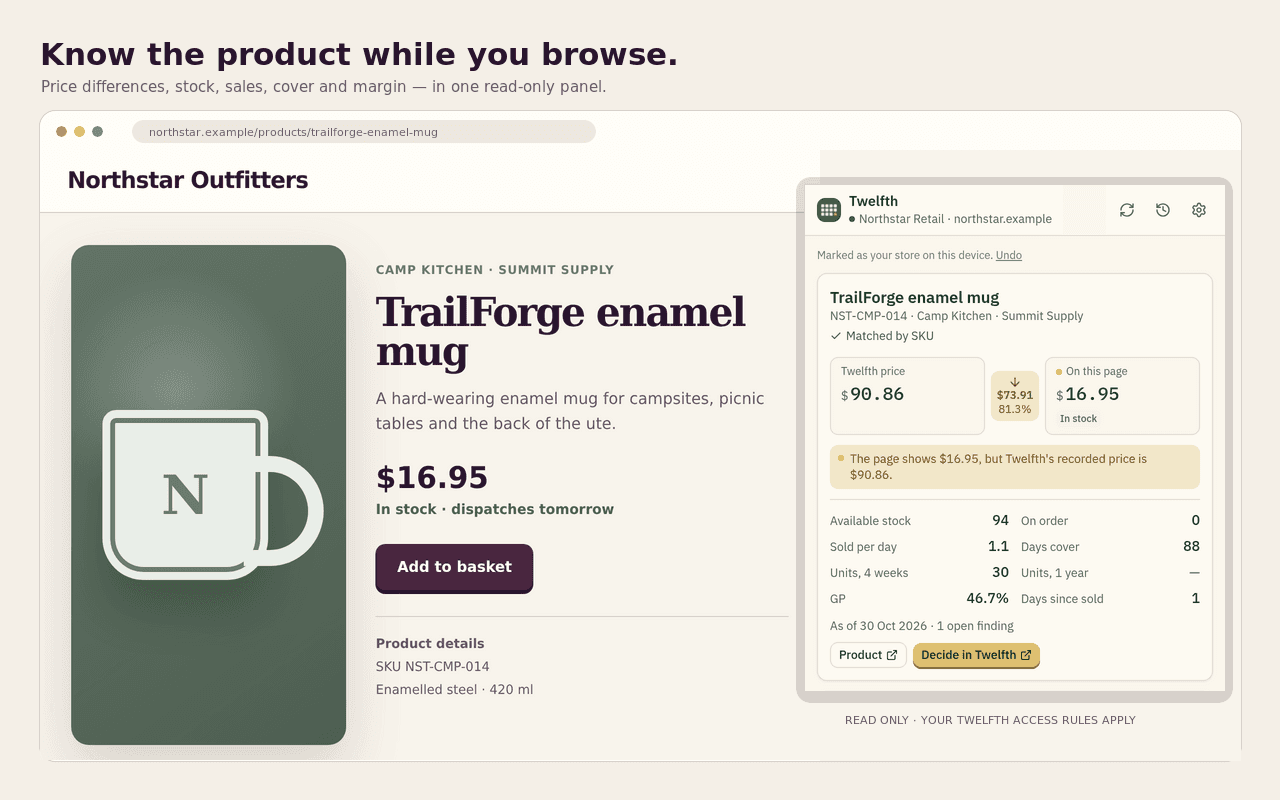
- Reads on clickThe extension waits until you click it on that site.
- Matches exactlySKU, MPN, GTIN or a known product URL identifies the product.
- Stays read-onlyIt cannot change products, prices or anything else in twelfth.
From the page to a grounded decision.
The panel follows the product you are looking at, without turning the browser into another data feed.
- Open
Browse the product page.
Use your own store or a competitor your workspace already tracks.
- Read
Click the twelfth button.
The panel matches the page and brings in the product, supplier, stock and commercial figures you can access.
- Decide
Take the next question with you.
Open the product record, jump to another known listing, or start a twelfth chat grounded in the product and page.
What arrives beside the page.
Page facts stay visibly separate from the commercial record your team already trusts.
- On this page
- Title, SKU, GTIN, MPN, price, availability and canonical URL.
- From twelfth
- Supplier, stock, rate of sale, cover, sales, GP and the recorded price.
- Across tracked retailers
- The competitor prices twelfth last collected, their four-week trend and known product-page links.

The extension waits for you.
It reads a product page when you ask, keeps browser facts labelled as browser facts, and follows the access rules already attached to your account.
Read the full privacy and setup guide- ACCESS RECEIPT
- TWELFTH FOR CHROME
- No background reading
- A new site needs your click before the extension reads its product page.
- No cookies or forms
- It reads product details from the page, not cookies, forms or unrelated page content.
- No feed writes
- Browser-observed details stay evidence. They are not saved into product or pricing feeds.
- Your access rules apply
- The panel only shows the workspace, role and remit data you are already allowed to read.
- MODE
- READ ONLY
Questions before you install.
- Does it work on any retail website?
- It works on your own store and on competitors your workspace tracks. On a competitor, twelfth needs an exact known URL, retailer SKU or GTIN. A similar title is not treated as proof.
- Does it scrape live competitor prices?
- No. The panel shows the competitor prices twelfth last collected, with their collection time and four-week trend where available.
- Can it change anything in twelfth?
- No. This extension is read-only. Decide in twelfth opens a chat with browser-observed facts attached, but the extension does not edit a product, price or match.
- Where do I get setup help?
- The Chrome extension guide covers installation, sign-in, use, troubleshooting and support. You can also email hello@twelfth.ai from the support section.
Work with twelfth
Keep the product page open. Bring twelfth beside it.
Install the read-only Chrome side panel, then sign in with your twelfth workspace.
Chrome on desktop · A twelfth workspace is required